node{

  stage("checkout the code"){

    println "from build stage"

  }

}
node("node name or lable"){

  stage("checkout the code"){

    println "from build stage"

  }
  stage("Build"){

    println "from build stage"

  }

  stage("sonar"){

    println "from sonar stage"
  }

  stage("deploy to nexus"){

    println "from deploy stage"
  }

  stage("deploy to server"){

    println "from deploy stage"
  }

}
    node{

      stage("clone the code"){

        println "git cloning the code"

        git branch: 'web', credentialsId: 'jengitub', url: 'https://github.com/venkatasykam/DevOpsWebApp.git'

        println "git cloning completed"

      }

      stage("maven build"){

        println "maven build"

        println "build version(in pipeline script): ${params.releaseVersion}"

        sh'''

            echo "build version(inside the sh block): ${releaseVersion}"

            "/root/apache-maven-3.8.1/bin/mvn" clean install -DreleaseVersion=${releaseVersion}

            echo "====== Maven Build Successful============="

        '''

        //bat 'java -version'

        //bat 'mvn clean install'

      }

    }
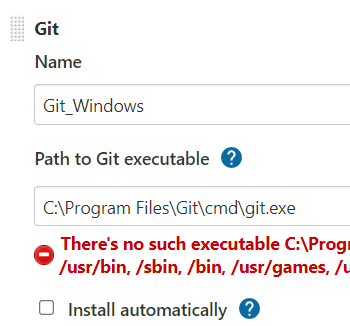
Example-4: Build on any available node (below script is compatible to windows only - but make sure java, maven, git is already installed on jenkins windows node). Configure git path on windows as shown below - Manage Jenkins >> Global Tool Configuration >> Add git and the path (you can ignore the red color errors)
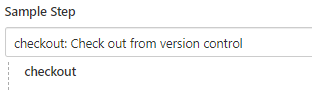
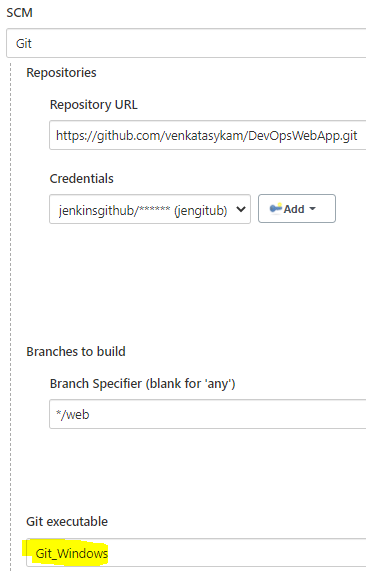
Generate Pipeline script
      node("maven-windows"){

          stage("clone the code"){

            println "git cloning the code"

            //git branch: 'web', credentialsId: 'jengitub', url: 'https://github.com/venkatasykam/DevOpsWebApp.git'

            checkout([$class: 'GitSCM', branches: [[name: '*/web']], extensions: [], gitTool: 'Git_Windows', userRemoteConfigs: [[credentialsId: 'jengitub', url: 'https://github.com/venkatasykam/DevOpsWebApp.git']]])

            println "git cloning completed"

          }

          stage("maven build"){

            println "maven build"

            println "build version(in pipeline script): ${params.releaseVersion}"

            bat 'java -version'

            bat ' "C:\\ProgramData\\chocolatey\\lib\\maven\\apache-maven-3.8.2\\bin\\mvn" clean install -DreleaseVersion=%releaseVersion% '

          }

        }
      node("maven"){

          stage("clone the code"){

            println "git cloning the code"

             if (isUnix()) {

                git branch: 'web', credentialsId: 'jengitub', url: 'https://github.com/venkatasykam/DevOpsWebApp.git'

             }else{

                checkout([$class: 'GitSCM', branches: [[name: '*/web']], extensions: [], gitTool: 'Git_Windows', userRemoteConfigs: [[credentialsId: 'jengitub', url: 'https://github.com/venkatasykam/DevOpsWebApp.git']]])
             }
            println "git cloning completed"

          }

          stage("maven build"){

            println "maven build"

            println "build version(in pipeline script): ${params.releaseVersion}"

            if (isUnix()) {
                sh'''

                    echo "build version(inside the sh block): ${releaseVersion}"

                    "/root/apache-maven-3.8.1/bin/mvn" clean install -DreleaseVersion=${releaseVersion}

                    echo "====== Maven Build Successful============="

                '''
            }else{

                bat 'java -version'

                bat ' "C:\\ProgramData\\chocolatey\\lib\\maven\\apache-maven-3.8.2\\bin\\mvn" clean install -DreleaseVersion=%releaseVersion% '
            }
          }

        }