Python 练习实例57
题目: 画图,学用line画直线。
程序分析: 无。
实例
if __name__ == ' __main__ ' :
from Tkinter import *
canvas = Canvas ( width = 300 , height = 300 , bg = ' green ' )
canvas . pack ( expand = YES , fill = BOTH )
x0 = 263
y0 = 263
y1 = 275
x1 = 275
for i in range ( 19 ) :
canvas . create_line ( x0 , y0 , x0 , y1 , width = 1 , fill = ' red ' )
x0 = x0 - 5
y0 = y0 - 5
x1 = x1 + 5
y1 = y1 + 5
x0 = 263
y1 = 275
y0 = 263
for i in range ( 21 ) :
canvas . create_line ( x0 , y0 , x0 , y1 , fill = ' red ' )
x0 += 5
y0 += 5
y1 += 5
mainloop ( )
以上实例输出结果为:
');
var statusdiv=$('#comment-status');
commentform.submit(function(e){
e.preventDefault();
var noteContent = editor.getValue();
// console.log(noteContent);
noteContent = noteContent.replace(/
/g,"");
noteContent = noteContent.replace(//g," ");
// 系列化表单数据
var comment_parent = 0;
var is_user_logged_in = $("#is_user_logged_in").val();
var comment_post_ID = 14236;
var _wp_unfiltered_html_comment = $("#_wp_unfiltered_html_comment").val();
var comment = noteContent;
var author = $("#author").val();
var url = $("#url").val();
var email = $("#email").val();
if(isBlank(author) && is_user_logged_in==0) {
statusdiv.html('请输入昵称!
').show();
} else if(isBlank(email) && is_user_logged_in==0) {
statusdiv.html('请输入邮箱!
').show();
} else {
// var formdata=commentform.serialize() + "&comment=" + noteContent ;
// 添加状态信息
statusdiv.html('Processing...
').show();
// 获取表单提交地址
var formurl=commentform.attr('action');
// 异步提交
$.ajax({
type: 'post',
url: formurl,
dataType:'json',
data: {"comment_parent":comment_parent,"comment_post_ID":comment_post_ID, "_wp_unfiltered_html_comment":_wp_unfiltered_html_comment,"comment":comment,"url":url, "email":email,"author":author},
error: function(XMLHttpRequest, textStatus, errorThrown){
statusdiv.html('数据不完整或表单提交太快了!
').show();
},
success: function(data, textStatus){
if(data.errorno=="0") {
$("#submit").prop('disabled', true);
statusdiv.html('笔记已提交审核,感谢分享笔记!
').show();
alert('笔记已提交审核,感谢分享笔记!');
}else{
statusdiv.html(''+data.msg+'
').show();
}
commentform.find('textarea[name=comment]').val('');
}
});
setTimeout(function(){
$("#submit").prop('disabled', false);
}, 10*1000);
}
return false;
});
$(".comt-author").click(function() {
href = $(this).children("a").attr("href");
if(href.indexOf("/note/")!=-1) {
var win = window.open(href, '_blank');
win.focus();
}
});
$(".comt-meta span").hover(function(){
$(this).children(".tooltip").css({ "opacity": 1, "pointer-events": "auto"});
},function(){
$(this).children(".tooltip").removeAttr("style");
});
/*
$(".wrapper i").hover(function(){
$(this).siblings(".tooltip").css({ "opacity": 1, "pointer-events": "auto"});
},function(){
$(this).siblings(".tooltip").css({ "opacity": 0, "pointer-events": "auto"});
});
*/
//Upvote.create('runoobvote-id', {callback: vote_callback});
var ajaxurl = 'https://www.runoob.com/wp-admin/admin-ajax.php';
var callback = function(data) {
//console.log($('#runoobvote-id').upvote('upvoted'));
//console.log($('#runoobvote-id').upvote('downvoted'));
//console.log(data);
_vote_action = data.action;
id_arr = data.id.split('-');
um_id= id_arr[2];
//console.log(um_id);
var re = /^[1-9]+/;
if (re.test(um_id)) {
var ajax_data = {
_vote_action: _vote_action,
action: "pinglun_zan",
um_id: um_id,
um_action: "ding"
};
//console.log(ajax_data);
$.post(ajaxurl,ajax_data,function(status){
//if(status.vote_num>999) {
// _voteHtml = ''+kFormatter(status.vote_num) +' ';
// $("#runoobvote-id-" + um_id + " .count").hide().after(_voteHtml);
//}
});
}
};
if($('#comments').length && $('.upvotejs').length){
$('.upvotejs').upvote({id: 14236, callback: callback});
$.post(ajaxurl,{"action":"pinglun_zan","postid":14236},function(data){
$(data).each(function(key,value) {
$("#runoobvote-id-" + value.commid + " .upvote").addClass(value.upvotejs_class);
$("#runoobvote-id-" + value.commid + " .downvote").addClass(value.downvote_class);
$("#runoobvote-id-" + value.commid + " .count").text(value.upvote_count);
})
},'json');
}
});
function isBlank(str) {
return (!str || /^\s*$/.test(str));
}
function kFormatter(num) {
// return num;
return Math.abs(num) > 999 ? Math.sign(num)*((Math.abs(num)/1000).toFixed(1)) + 'k' : Math.sign(num)*Math.abs(num)
}
 Python 100例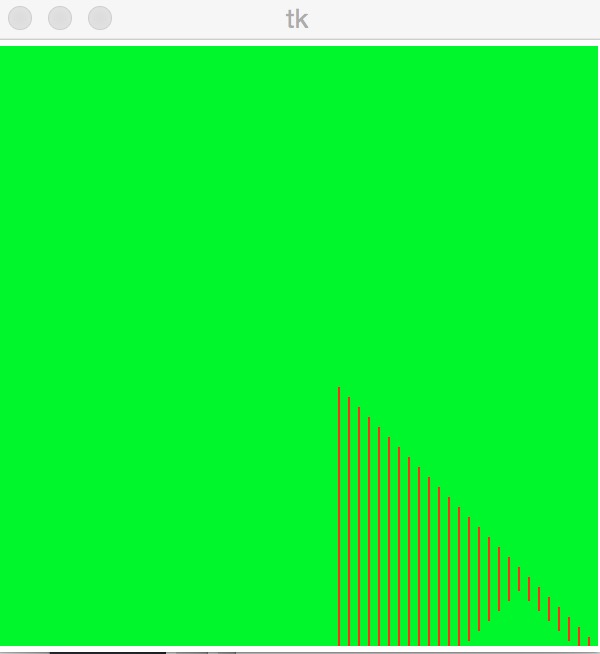

bihar
sbh***163.com
参考实例:
bihar
sbh***163.com
bao
bao***[email protected]
Python3 中使用 turtle 模块画图。
import turtle

def drawline(n):
    t=turtle.Pen()
    t.color(0.3,0.8,0.6)  #设置颜色,在0--1之间
    t.begin_fill()   #开始填充颜色
    for i in range(n): #任意边形
        t.forward(50)
        t.left(360/n)
    t.end_fill()    #结束填充颜色

drawline(4)
bao
bao***[email protected]